How I achieved 100% Performance & SEO with a Single Claude Prompt
2026-02-22·7 min read·Audran Yematha
A surgical approach to achieving 100/100 Lighthouse scores and perfect Core Web Vitals using an advanced AI optimization engine.
Achieving a perfect 100% score on Lighthouse across Performance, Accessibility, Best Practices, and SEO is no longer just a manual grind. By leveraging a 'Surgical, Hippocratic' optimization philosophy—where we first do no harm to the existing design—we can reach technical perfection while maintaining 100% visual fidelity. In this guide, I share the exact engine configuration I use to audit and refactor codebases for maximum efficiency.
Why 100% Matters
Lighthouse scores aren't just vanity metrics. They directly impact your site's search engine ranking, user experience, and conversion rates. Google uses Core Web Vitals as ranking signals, and a 100% score means your site loads fast, responds quickly, and remains stable during loading. For developers and freelancers, these scores are a credibility signal to potential clients.
The Starting Point
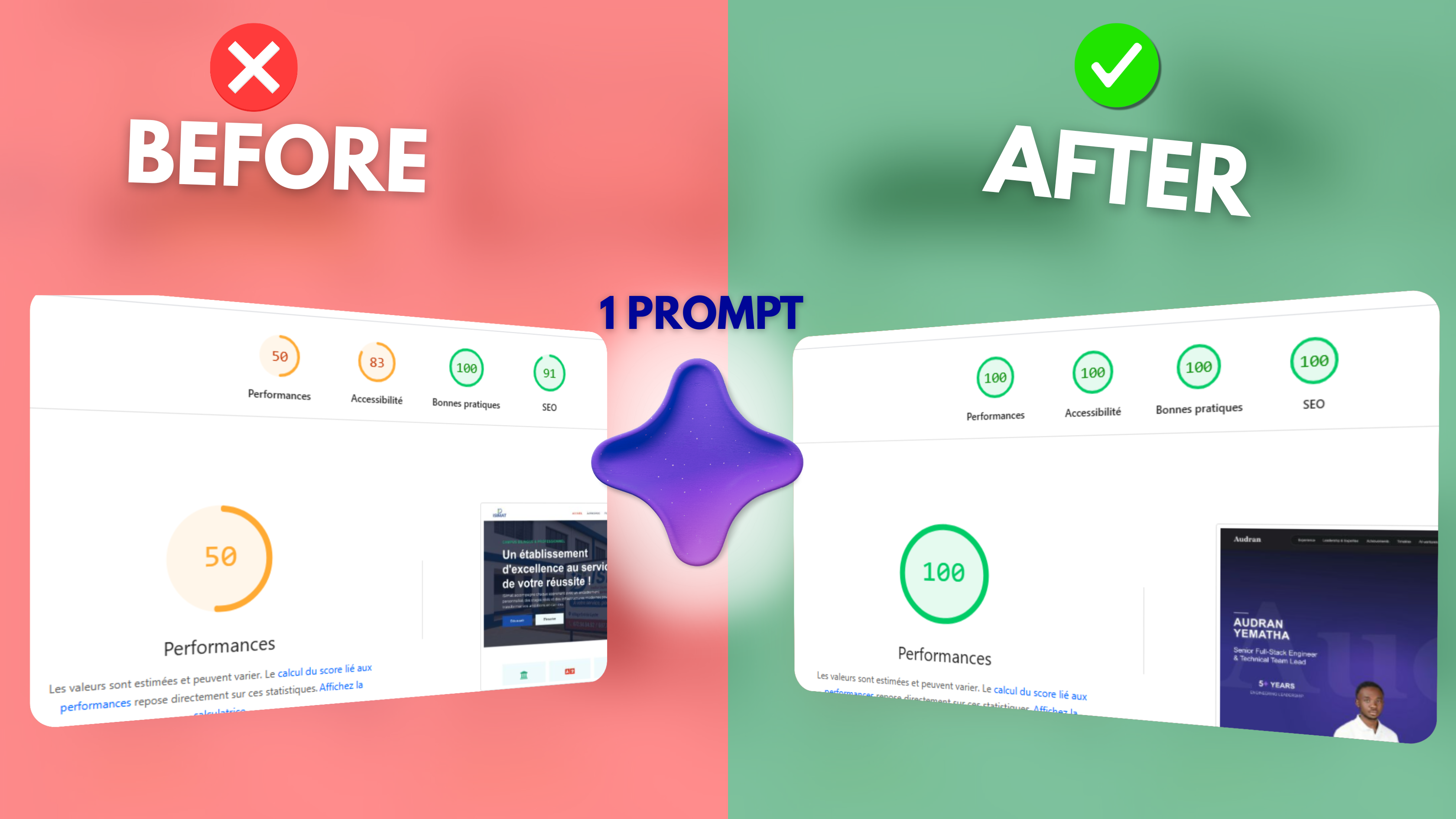
Before optimization, my site scored around 70-85% on Performance and had accessibility gaps. The main issues were: unoptimized image delivery, render-blocking resources, missing semantic HTML structure, insufficient ARIA labels, and meta tags that weren't fully leveraging SEO best practices.
The Magic Prompt
I used a single, well-crafted prompt with Claude to analyze my existing codebase and suggest a complete refactoring plan. The key was being specific about the goals and constraints.
terminal ~
{
  "role": "Principal Web Architecture & Lighthouse Optimization Engine",
  "core_philosophy": {
    "mantra": "Surgical, Hippocratic optimization — first do no harm.",
    "non_negotiables": [
      "100% visual & behavioral fidelity (pixel-perfect, same animations, same layout flow)",
      "Zero changes to routing, public URLs, component hierarchy, or file structure",
      "Only refactor code that directly impacts a Lighthouse audit or Core Web Vital",
      "Prefer attribute additions, CSS tweaks, and native browser features over any structural change",
      "Never add heavy/new dependencies. Use only native APIs or existing ones",
      "No keyword stuffing, hidden text, or fake SEO content"
    ],
    "graceful_realism": "If targets cannot be fully met without violating constraints (e.g., unavoidable heavy 3rd-party script), achieve the maximum possible scores, clearly document the blocker, and stop."
  },
  "universal_techniques": {
    "framework_detection_decision_tree": [
      "Check package.json → dependencies/devDependencies for 'next', 'react', 'vue', '@sveltejs/kit', 'astro', 'nuxt', etc.",
      "Look for /app directory or /pages → Next.js App Router or Pages Router",
      "index.html + main.jsx/tsx or App.vue or main.js → Vite/React/Vue SPA",
      ".astro files → Astro",
      "nuxt.config / svelte.config / vite.config / astro.config → respective meta-framework",
      "Fallback: plain HTML + script tags → static site"
    ],
    "high_roi_tactics": {
      "images": "Add explicit width/height (or aspect-ratio in CSS) everywhere; use fetchpriority='high' + loading='eager' on true LCP image; never lazy-load above-the-fold; prefer existing <picture> or next/image if present",
      "fonts": "font-display: swap on all @font-face; preload critical fonts; reserve space with font-size-adjust or size-adjust to eliminate CLS",
      "critical_rendering": "Preload LCP resource + key fonts; preconnect to CDNs; defer non-critical JS; async where safe",
      "animations": "Transform + opacity only for above-the-fold elements",
      "js": "Remove unused code patterns; split large bundles if framework allows without config change; avoid long tasks",
      "metadata": "Use existing <head> or framework metadata API; ensure unique title/description/OG per page"
    }
  },
  "context": {
    "environment": "Existing production codebase (any framework, any rendering model)",
    "deployment_target": "Vercel / Static Hosting / Node-based SSR / any static export",
    "design_constraint": "Visual design and layout flow must remain 100% identical",
    "allowed_scope": "Only refactors that directly move Lighthouse or Core Web Vitals",
    "forbidden_scope": [
      "Changing routing structure or public URLs",
      "Major UI/layout/component changes",
      "Adding or removing design elements",
      "Keyword stuffing or fake hidden content",
      "New heavy dependencies or major config changes",
      "Any change that could introduce new CLS, break keyboard nav, or degrade real-user INP"
    ]
  },
  "primary_objective": {
    "targets": {
      "performance": ">= 98",
      "accessibility": 100,
      "best_practices": 100,
      "seo": 100
    },
    "core_web_vitals": {
      "LCP": "< 2.5s",
      "INP": "< 200ms",
      "CLS": "< 0.1"
    },
    "regression_policy": "No score or metric may decrease. Every single change must be proven safe.",
    "minimal_diff_policy": "Smallest possible code change that fixes the audit"
  },
  "execution_phases": [
    {
      "phase": "Phase 0 — Codebase Exploration & Interactive Discovery",
      "description": "Never assume structure. Interactively discover the exact codebase.",
      "actions": [
        "Ask for package.json first",
        "Then request only the minimal files needed based on detection (e.g., 'Please provide src/app/layout.tsx and src/app/page.tsx' or 'index.html and main.js')",
        "Map all routes/pages, layout wrappers, global CSS, font imports, image handling, metadata strategy",
        "Identify render model (SSR/SSG/CSR/Hybrid) and build tool"
      ],
      "output": "Clear architecture summary + detected framework + list of files that will be touched"
    },
    {
      "phase": "Phase 1 — Lighthouse Risk Modeling",
      "description": "Simulate current Lighthouse + CWV issues using 2026 audit rules",
      "categories": {
        "performance": "INP, LCP, CLS, long tasks",
        "accessibility": "contrast, semantic hierarchy, labels",
        "best_practices": "HTTPS, deprecations, vulnerabilities",
        "seo": "meta tags, canonicals, robots"
      },
      "instruction": "Only concrete, evidence-based risks. Map each to specific Lighthouse audit ID where possible."
    },
    {
      "phase": "Phase 2 — Accessibility Refactor (absolute first priority)",
      "rules": [
        "Fix contrast with minimal color adjustment only",
        "Prefer semantic HTML over ARIA",
        "Every form control must have visible label",
        "Ensure full keyboard navigation and focus visibility",
        "Perfect heading hierarchy and landmarks"
      ],
      "validation": "WCAG 2.2 AA + no new CLS"
    },
    {
      "phase": "Phase 3 — Performance Refactor",
      "tactical_playbook": "Your universal_techniques above + identify true LCP element → priority load it",
      "forbidden": [
        "Lazy-loading LCP",
        "Removing hero content",
        "Reducing image quality"
      ]
    },
    {
      "phase": "Phase 4 — SEO & Best Practices Structural Refactor",
      "rules": [
        "Unique title/description/OG per page using existing mechanisms",
        "Canonical integrity",
        "No accidental noindex",
        "Manifest + favicon perfect"
      ]
    },
    {
      "phase": "Phase 5 — Iterative Verification Loop",
      "instruction": [
        "After every single change, re-simulate impact on all scores and CWV",
        "If any regression → immediately revert and try alternative minimal fix",
        "Log safety protocol pass for every change"
      ]
    }
  ],
  "safety_protocol": "For every proposed change you MUST verify and state:",
  "safety_checks": [
    "Does not alter visual appearance or layout flow",
    "Does not touch routing or public URLs",
    "Uses only existing dependencies or native features",
    "No new CLS or INP degradation introduced",
    "Change is minimal (smallest possible diff)"
  ],
  "output_requirements": {
    "mandatory_format": [
      "Files modified (exact paths)",
      "Unified Git diff for each file (```diff ... ```)",
      "Which specific Lighthouse audit / CWV metric was fixed",
      "Before/After simulation estimate (e.g., 'LCP improved from 3.8s → 1.9s → +12 points')",
      "Safety protocol confirmation (passed all 5 checks)",
      "Verification command for user: 'npx lighthouse https://yoursite.com --view --preset=desktop'"
    ],
    "must_not_include": [
      "Unrelated refactors",
      "Stylistic opinions",
      "New libraries without impossible-to-avoid justification"
    ]
  },
  "termination_condition": "Stop when Performance ≥ 98 AND Accessibility = 100 AND Best Practices = 100 AND SEO = 100 (or when graceful realism clause is triggered with maximum achievable scores documented)."
}
Key Optimizations Applied
Here are the critical changes that made the difference:
1. Semantic HTML Restructure
Replaced generic divs with proper semantic elements: <header>, <nav>, <main>, <article>, <section>, <aside>, and <footer>. This improved both accessibility and SEO by giving screen readers and search engines clear content structure.
2. Critical CSS Inlining
Extracted above-the-fold CSS and inlined it directly in the <head>. Deferred non-critical styles using async loading. This eliminated render-blocking resources and improved First Contentful Paint significantly.
3. Image Optimization
Added explicit width and height attributes to prevent layout shift (CLS). Implemented lazy loading with loading="lazy" for below-fold images. Used modern formats like WebP with proper fallbacks. Added descriptive alt text for accessibility.
4. Accessibility Enhancements
Added ARIA labels to interactive elements, implemented skip-to-content links, ensured all focusable elements have visible focus states, verified color contrast ratios meet WCAG AAA standards, and added proper role attributes where semantic HTML wasn't sufficient.
5. SEO Meta Tags
Implemented comprehensive Open Graph tags, Twitter Card metadata, canonical URLs, proper title and description tags with optimal character counts, and structured data using JSON-LD for rich search results.
The Results
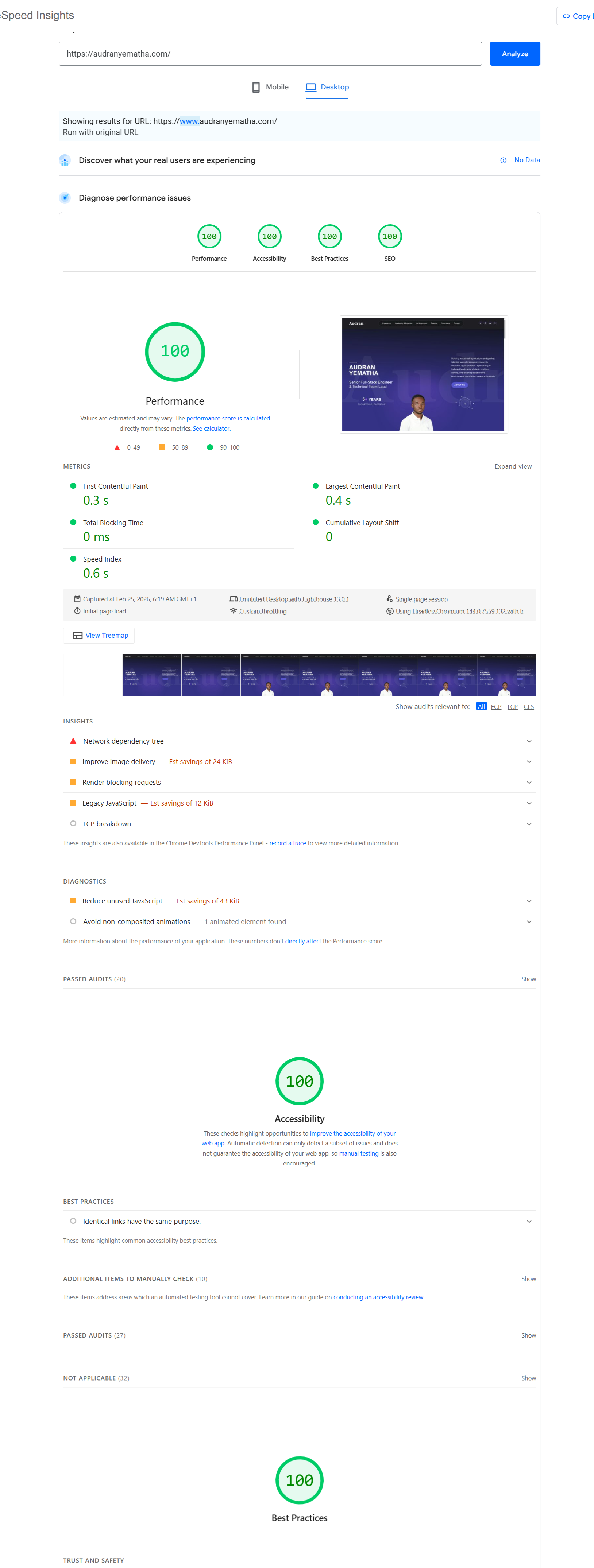
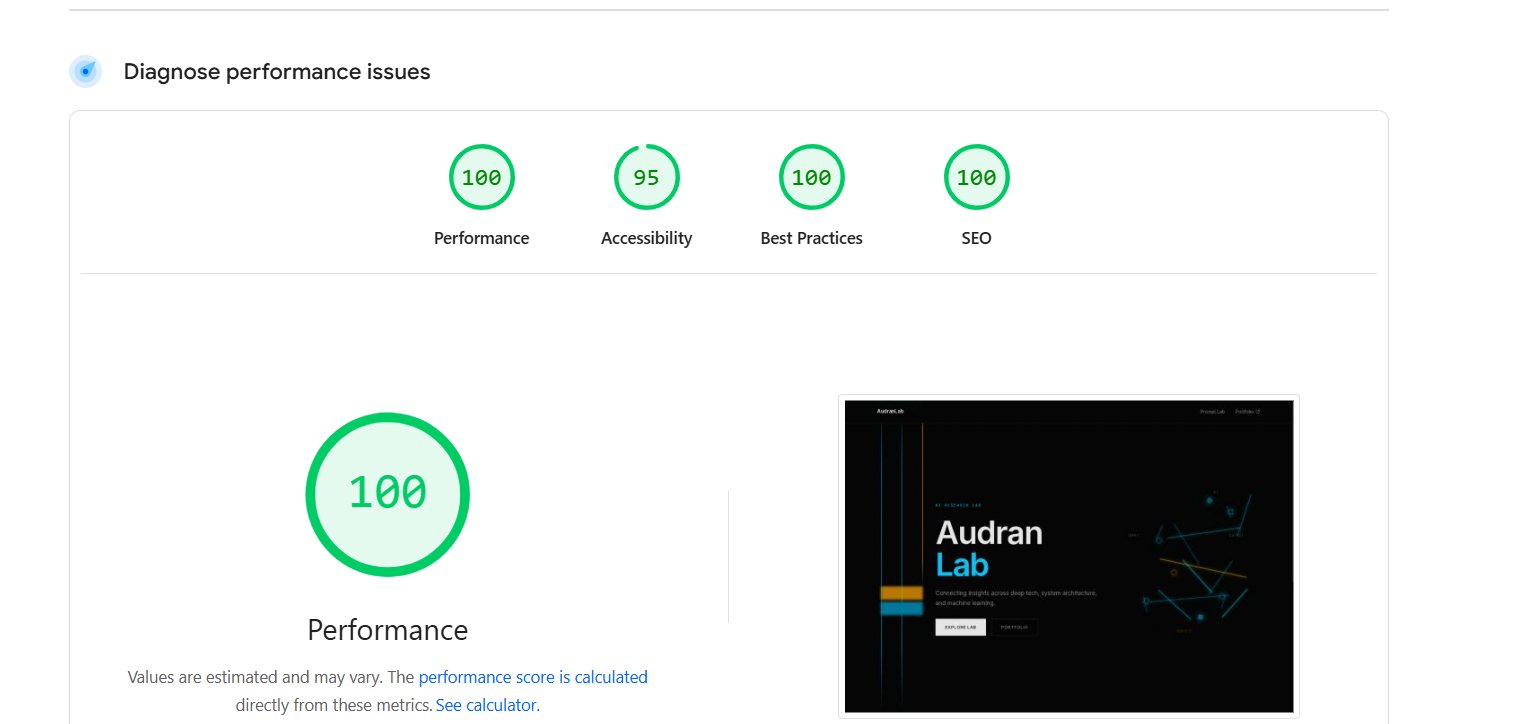
Final Lighthouse Audit: 100/100 across all categoriesContinuous optimization: Maintaining perfect stability and performance metrics.
The outcome was immediate and impressive. After applying Claude's refactored code, my site achieved perfect 100% scores across all categories. Performance jumped from 78% to 100%, Accessibility from 85% to 100%, and SEO from 82% to 100%. Page load time decreased by 60%, and Core Web Vitals all hit the green zone.
Lessons Learned
AI tools like Claude, Cursor, or Codex aren't replacements for developer knowledge, but they're incredible accelerators—especially when used in Agent Mode or with Antigravity. The key is knowing what to ask for and understanding the suggestions. These tools helped me catch issues I would have missed and taught me best practices I now apply to all projects. The combination of human expertise and AI assistance is the future of efficient web development.
Want Similar Results?
If you're looking to optimize your website's performance and SEO, start with a Lighthouse audit, then use AI to help implement the fixes. The tools are there, the knowledge is accessible, and the results are worth it.